Projects, purchasing, progress billing and investors, in one system
We implement Odoo for construction companies and real estate developers. Budget the materials for each project, contract and certify your subcontractors' progress, track costs per project and manage the investors in each development.
Illustrative screens with sample data
For
Construction companiesReal estate developersPrivate projectsHigh-rise buildingsCommunities and subdivisionsRenovation and maintenanceFewer spreadsheets, more control over every project
If you manage your projects with spreadsheets, folders and emails, you have probably run into some of these.
Your project's entire workflow
From the budget to paying the subcontractor, with construction modules and standard Odoo modules.
Projects as Odoo projects
Each construction project is a project with its planned date, its delivery warehouse and its analytic account.
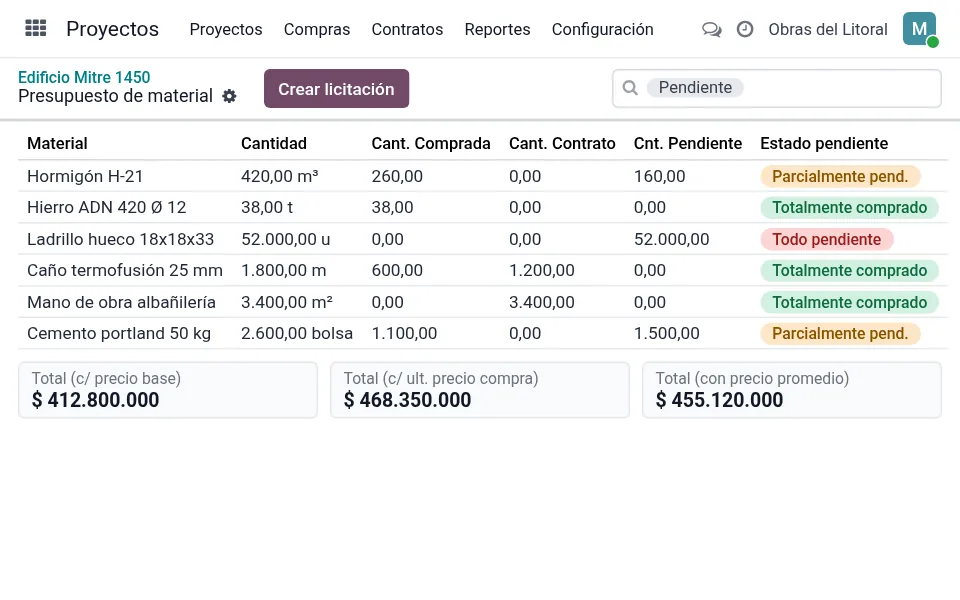
Material budget
Materials and labor by area, with quantity, required dates and the status of what is still pending purchase.
Prices and totals
Base, minimum, maximum, average and last purchase price for each material, and the project total with each one.
Tenders and purchasing
Create the tender from what is pending in the budget and receive purchases at the project's warehouse.
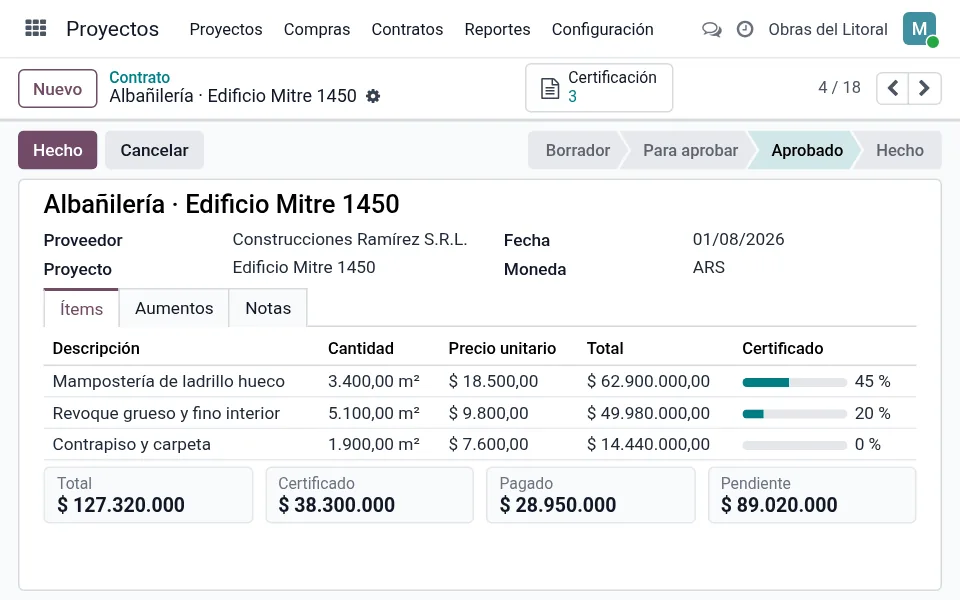
Subcontractor contracts
Contracts by item with templates, approval and index-based increases on unpaid lines or on all of them.
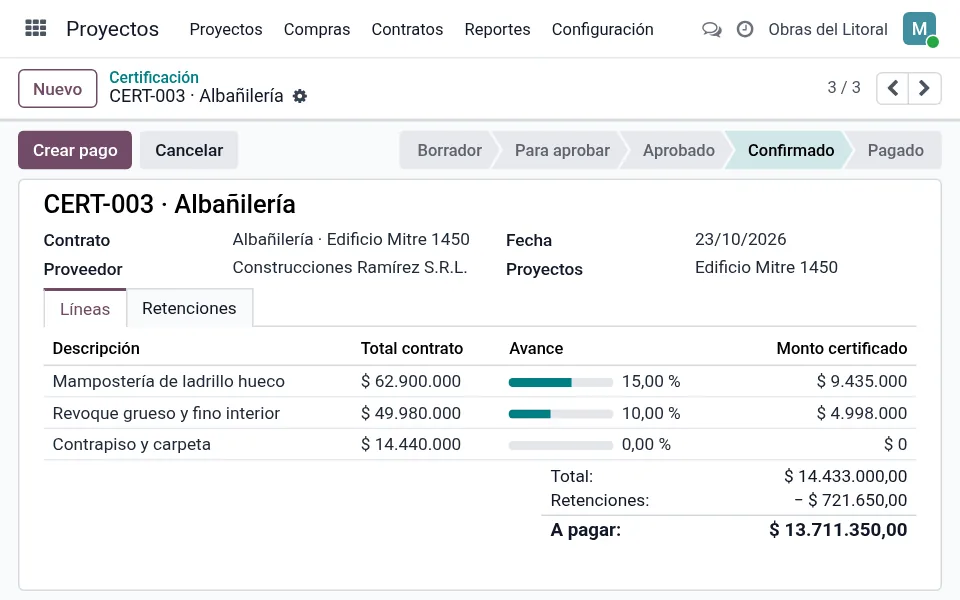
Progress certificates
Certify the progress of each contract item, with approval and a printed report.
Retentions
Retentions on each progress certificate, such as the retention fund, with their status and payment.
Costs per project
Everything charged to the project in its analytic account analysis: revenue, costs and balance.
From contract to payment, without spreadsheets
Contract, certify and pay your subcontractors with every step recorded on the project.
- 1Contract by itemItems with quantity and unit price, from a contract template, with approval.
- 2Progress certificateEach item's progress percentage calculates the certified amount.
- 3RetentionsRetentions on the progress certificate, which never exceed its total.
- 4PaymentCreate the vendor payment from the progress certificates; once posted, they are marked as paid.
Illustrative screen with sample data
Each project's investors, in order
For developers who finance their projects with investors.
Account per investor
One account per investor and project, with its currency and status: draft, active, suspended or closed.
Interest
Annual and monthly rate, with fixed nominal annual rate or compound interest, and automatic monthly interest calculation.
Project fundraising
Amount to raise, amount remaining and percentage raised for each project.
Investment inquiries
Log each inquiry with amount and meeting date, approve or reject it, and reply by email.
Investor portal
Each investor sees the capital, interest, balance and transactions of their investments in their account.
Account statement
Printable report with each investor's account.
We support you at every stage
SOLVO implements Odoo end to end: from the initial assessment to everyday use of the system.
Assessment and implementation
- We assess how your construction company works
- We configure Odoo around your processes
- Data import and migration from Excel
Training by department
- Site, purchasing, administration and investors
- Content based on each user's role
- Test environment to practice with your data
Ongoing support
- Help desk with a ticketing system
- Live chat
- WhatsApp support
Choose where to start
We put together a proposal based on the modules, users and number of projects and developments you manage.
Site
To organize purchasing and costs for each project.
- Projects as Odoo projects
- Material budget
- Tenders and purchasing per project
- Costs per project
Construction
To work with subcontractors.
- Everything in the Site plan
- Subcontractor contracts
- Progress certificates
- Retentions
- Payments from progress certificates
Development
For developers with investors.
- Everything in the Construction plan
- Investor accounts
- Monthly interest
- Fundraising per project
- Investor portal
What we get asked most
What system is it?
It's Odoo, implemented by SOLVO with construction modules (budget, contracts, progress certificates and investors), plus standard Project, Purchase, Inventory, electronic invoicing with ARCA (Argentina) and Accounting modules.
How is a project budget built?
You enter materials and labor by area, with quantity and base price. The system shows how much has already been purchased, how much is covered by contracts, and how much is left.
Can I certify my subcontractors' progress?
Yes. Each contract has its items, and in each progress certificate you enter the progress of each item. The system calculates the certified amount, the retentions and the amount payable.
How are retentions handled?
You enter the retentions for each progress certificate, for example a retention fund. They stay open until paid and can never exceed the certificate total.
Can I adjust contracts?
Yes. You record index-based increases, applied only to unpaid lines or to all contract lines.
Can it manage investors?
Yes. Each investor has an account per project with contributions, withdrawals and interest, and can check it from the portal.
How much does it cost?
It depends on the modules, the number of users and the number of projects. Contact us and we'll put together a proposal.
What support do I get once I'm up and running?
You get a help desk with a ticketing system, live chat and WhatsApp support.
Tell us how your construction company works
We'll show you how your projects would look in Odoo and put together a proposal.